Every few months someone online declares that air fryers cost “pennies” to run, and someone else replies that theirs has doubled the electricity bill. Both can’t be right, and the honest answer is that it depends on your machine, what you cook and how you cook it. The good news is you don’t have to guess. A plug-in energy monitor will tell you exactly what your own air fryer uses, cook by cook. This guide covers how to work the numbers out yourself, and whether the Tapo P110, one of the most popular monitoring smart plugs on Amazon UK, is worth buying to do it.
At a glance
- The short answer: an air fryer’s running cost comes down to kilowatt-hours (kWh) used, multiplied by the unit rate on your electricity bill
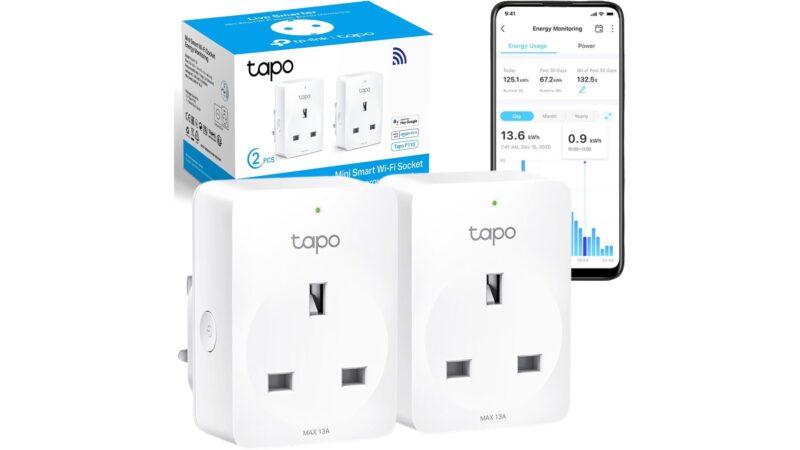
- The product: Tapo P110, a UK smart plug that measures the power going through it and logs daily and monthly use in an app (sold as a 2-pack)
- Rated for: 13A maximum, which covers any normal plug-in air fryer
- Best for: anyone who wants real figures for their air fryer, kettle or coffee machine instead of rough online estimates
- Think twice if: your Wi-Fi is patchy in the kitchen, or you’d want to switch the air fryer on remotely (more on why that’s a bad idea below)
- Owner rating: 4.6 out of 5 from over 54,000 ratings on Amazon UK at the time of writing
How to work out what your air fryer costs to run
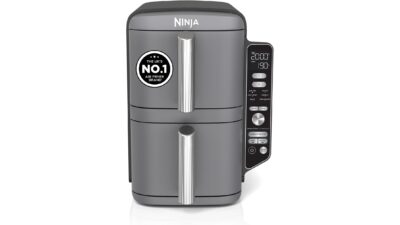
Look on the back or underneath your air fryer for its wattage. Most mid-sized models sit somewhere between 1,200W and 1,800W, and the bigger dual-drawer ones can go higher. That figure is the maximum the heating element and fan draw together.
The sum is simple: watts divided by 1,000, multiplied by hours of cooking, gives you kWh. So a 1,500W air fryer running flat out for 20 minutes uses at most 0.5kWh. Multiply that by the unit rate printed on your bill and you’ve got the cost of that cook.
Here’s the bit most online calculators skip. That 0.5kWh is a ceiling, not a real figure. Once the basket reaches temperature, the element cycles on and off to hold it there, so a 20-minute cook rarely draws full power for all 20 minutes. How much less depends on the model, the temperature and how often you pull the drawer out to shake things. That’s exactly why measuring beats estimating.
Is an air fryer actually cheaper than the oven?
For small portions, usually yes, and it’s mostly down to size. A full-size electric oven has a far bigger space to heat, tends to have a higher-rated element, and often needs a proper preheat before anything goes in. An air fryer heats a small basket and gets going in a few minutes.
The gap narrows when you cook in batches. If you’re doing three rounds of chips to feed a family, an oven that does the lot in one go may come out closer than you’d think. If you want the full comparison of how the two actually cook, we’ve covered the difference between an air fryer and a convection oven separately.
What the Tapo P110 does
The P110 plugs into a normal UK wall socket and your appliance plugs into it. Through the free Tapo app it shows the power being drawn right now, plus usage for today, the past week and the past month. You can type in your own electricity rate and the app will turn kWh into a cost estimate for you, which saves doing the sums by hand.
It also does the usual smart plug things: on/off from your phone, schedules and timers, voice control through Alexa or Google Assistant, and sharing control with other people in the house. It connects straight to your Wi-Fi with no hub.
Pros
- Real measurements instead of guesses, logged over days and months so you can see a pattern
- Rated up to 13A, so it handles air fryers, kettles and coffee machines that a lot of cheap monitors can’t
- Compact for a smart plug, and the 2-pack means you can monitor two appliances at once
- Huge number of owner ratings, with setup and reliability the most praised points in reviews
- Enter your own tariff and the app does the cost maths
Cons
- Wi-Fi only, and only on the 2.4GHz band, so it can struggle in kitchens at the far end of a flat from the router. Connectivity is the most mixed area of the owner feedback
- All your data lives in the app. There’s no screen on the plug itself, so if you just want a quick one-off reading, a basic plug-in meter with an LCD display is simpler
- You need a Tapo account, and the plug depends on the app staying supported
- TP-Link says to avoid appliances with motors or compressors above 1/6HP, which rules out things like air conditioners. Air fryers are fine, but it’s worth knowing the limit exists
The safety bit: monitor, don’t remote-start
This is the part people get wrong. Plenty of air fryer manuals say not to run the appliance from an external timer or remote-control system, and there’s a good reason: you don’t want something that gets that hot switching on when nobody’s in the kitchen. Check your own manual, but the safe way to use a P110 with an air fryer is to leave the plug switched on and treat it purely as a meter. Don’t schedule the air fryer, and don’t switch it on from the sofa.
A couple of other common-sense points. Plug the P110 directly into a wall socket rather than an extension lead, and don’t stack it with another adapter. If the plug or socket ever feels warm under load, stop using it.
Who it’s for
It makes most sense if you’ve just bought an air fryer, or are thinking about cooking more in the one you’ve got, and want to know whether it’s genuinely saving you anything over the oven. Run it for a fortnight of normal cooking and you’ll have a far better answer than any calculator can give you.
It’s also handy for the other heavy users on a kitchen worktop. A kettle, coffee machine or slow cooker can all go through the second plug in the pack. If you’re weighing up a small coffee machine, our look at whether the Nespresso Vertuo Pop fits a tiny counter is a good place to start.
If you just want a single figure for one appliance and don’t care about smart features, a simple plug-in meter with a display will do the job without Wi-Fi or an account.
How to use it to measure your air fryer
- Install the Tapo app, plug the P110 into the wall and follow the setup to join it to your 2.4GHz Wi-Fi
- Add your electricity unit rate in the app’s energy settings
- Plug the air fryer into the P110 and leave the P110 switched on
- Cook as normal and check the energy usage afterwards. For a fair picture, look at a whole week rather than one meal
- Try the same food at a slightly lower temperature or without preheating and compare. Small changes add up
A few ways to cut what your air fryer uses
- Skip the preheat when the recipe doesn’t really need it. Frozen chips and nuggets usually cope fine starting cold, just add a couple of minutes
- Don’t overfill the basket. Crowded food cooks unevenly, and you end up adding time
- Keep the drawer shut as much as you can. Every shake lets heat out
- Cook things back to back while the basket’s already hot
- Pick the right size machine. A small air fryer for one person heats less space. Our guide to the best air fryers for one person and the Cosori 2L review are worth a look if you’re shopping
- Keep it clean. Built-up grease can smoke and smell, and a clean basket is easier to cook in evenly. Here’s how to clean the basket without scratching it
FAQ
How many kWh does an air fryer use?
At most, its wattage divided by 1,000 for every hour of cooking. A 1,500W model tops out at 1.5kWh an hour, so 0.5kWh for a 20-minute cook. Real use is lower because the element cycles once it’s up to temperature, which is why an energy monitor gives a better answer.
Is it safe to use a smart plug with an air fryer?
Using one as a meter, with the plug left on, is fine as long as the plug is rated for the load. The P110 is rated to 13A. What you shouldn’t do is use the plug to switch the air fryer on remotely or on a schedule, since many manuals warn against external timers. Check yours.
Does the Tapo P110 work without Wi-Fi?
The button on the side still switches it on and off, but the energy monitoring and app features need it connected to a 2.4GHz Wi-Fi network.
Can I use the same plug for my kettle or coffee machine?
Yes. Kettles are one of the biggest power draws in most kitchens, and at 13A the P110 can handle a standard UK kettle. It’s a good way to see how much those extra boils are adding up to.
The verdict
If you want to know what your air fryer really costs to run, stop reading calculator websites and measure it. The Tapo P110 is a sensible, well-reviewed way to do that, handles the load, and gives you a second plug for the kettle or coffee machine. Its weak spot is Wi-Fi, so if your kitchen is a dead zone, factor that in. Just use it as a meter, not a remote switch, and it’ll give you a straight answer to the “is my air fryer actually saving me money?” question.
You can check the current listing for the Tapo P110 2-pack on Amazon UK here: Tapo P110 Smart Plug with Energy Monitoring (2-pack).